It seems that every time I get in a conversation with snugug he tells me to avoid leveraging frameworks Now I still stand by my belief that frameworks are inevitable however I thought I would give it a try with a small proof of concept. In fact I would try to use as few libraries as possible and try to just use vanilla javascript.
Library freedom and curse
Normally I just use whatever libraries for development that the large framework suggest. So I use intern.io for testing Dojo, protractor for testing AngularJs, etc… On one hand this provides a immense amount of freedom and on the other hand adds significant overhead. Selecting a library is like selecting a restaurant for lunch next year from today’s yelp reviews. A thorough evaluation of the library capabilities, it’s community, and expected enhancements needs to be performed and alternatives considered. I can’t tell you how much time I lost comparing mocha to jasmine.
Even if you don’t leverage any libraries in your application and stick to standards you are faced with the very ugly truth. Not every browser implements standards the same way. Making up for this gap requires polyfills which results in the same overhead mentioned for selecting libraries.
Of course you could roll your own but frankly something as simple as XMLHttpRequest can be a nightmare. My favorite was finding out that in IE 9 the console object is undefined unless the developer tools are open. Don’t get me started about the hoops you need to jump though to get the PhantomJS Browser working.
Nothing more than NPM
Builds starts off simple and quickly gets very complicated. Gulp works especially well for complicated builds but it just ends up being more code to manage. The alternative is to just use NPM as a build tool. It works surprisingly well but I’m guessing there is an upper limit to how complicated your build can be since pre and post hooks can only get you so far. That being said I would suggest leveraging just NPM for build management until you actually need those additional capabilities. I should mention that I found it slower and sometimes wished I had used broccoli.
Conclusion
Many years ago I was brought in to address a project that was drowning in technical debt. It was 60,000 lines of Perl code. The head developer at the time didn’t trust modules or 3rd party libraries. He wrote everything himself so he could optimize it. The result was 6 weeks to resolve a defect and the time to bring on new developers was 4 months.
My first order of business was to draw boxes around code, look for duplication with modules on CPAN, and replace them. The result was a more manageable 5,000 lines of code. The interesting thing was performance got better. Mainly because even though the libraries were bigger they used new faster features of the language. The lesson I learned from that experience is you need to size your code for the resources maintaining it.
There is cost associated with using a framework, library, or micro-library. However there is also a cost with not using them. Shared code is always bloated but it gets updated more often with defect fixes and possibly faster techniques. I am not saying you should or should not use frameworks like Angular, React, Ember, etc… However you should understand your capabilities as a team and balance that against the end user experience.
This was a great experiment and as result I will only bring in frameworks as needed moving forward.
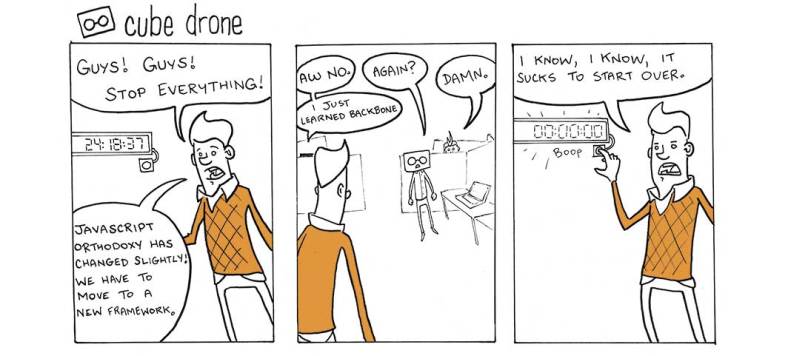
My personal belief is that coding frameworks are natural and can’t be avoided. Especially as projects mature and grow in size. They start as boilerplate code, best practices, and style guides. Then code is refactored into more manageable components and a framework emerges. That framework is used across many different projects and inherits use-cases that may not be relevant to your project and can be seen as bloat. Bloat leads to performance implications which then leads to considering a different framework or writing your own.
There comes a time when technical debt is so great it justifies a major change. For frameworks this means it is easier to migrate to a new framework than address the technical debt you have with the existing framework. In my experience the technical debt that drives this is less performance and more security or maintainability.
Up to this year I would have never thought on-boarding new developers could drive a framework change. I was in the camp a basic Computer Science degree as a solid foundation was enough. However majority of mastering a framework is less learning the terminology/usage and more understanding the community. Many of the frameworks today you just can’t buy a book. You need to learn by engaging the community.
Whenever you have or build top talent they always have one foot out the door. Finding a new developer takes time and requires resources from the team to vet the right candidate. Then they need to up-skill with assistance from the team. Finding and on-boarding a new developer can have a significant impact on the delivery schedule. Aligning some of the technologies/frameworks with talent in the marketplace reduces this overhead. This is probably the most frustrating driver of change. This should always be done with a cost/benefit analysis and not simply following the framework du jour.
So how do we address framework fatigue. On one hand you could choose a framework that you believe will be victorious and stick with it as long as you can. You could also manage your own framework and be responsible for everything. However I am not a betting man and don’t have the resources to keep up with every security edge-case. I would rather accept embrace change. So I externalize and break down logic as much as possible. Additional levels of abstraction impact performance so choose wisely. Lastly spend some time between retrospectives and planning sessions to perform gap analysis between what you are doing and where the frameworks are going. If you are using Angular 1.x is the direction Angular 2 aligned with your interest? Is there another framework with an active community better suited for your needs.
Ultimately the story of living with frameworks is about living with change, choice, and constant revalidation of direction and purpose.
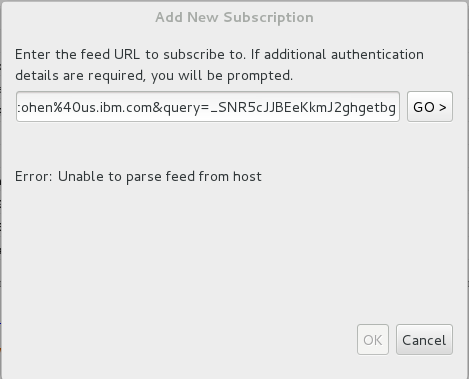
So let me start off by saying that Fedora 19 is not a supported environment for IBM products. That being said if you are living on the bleeding edge of technology like me you probably noticed that Rational Team Concert, Rational Application Developer, Rational Software Architect, or InfoSphere Data Architect do not work on Fedora 19 or the latest version of Ubuntu. The main reason for this is a defect in Eclipse 4.2.2 that they are built on. The resulting error looks like this:
The defect has to do with a bug in WebKitGTK. In WebKitGTK 1.10.x a crash can occur if an attempt is made to show a browser before a size has been set. There is a fix in Eclipse 4.3 but unfortunately the IBM tooling does not build on that yet.
The first alternative to consider is to use xulrunner instead. Unfortunately only xulrunner 1.9.2 is supported for 64 bit. This is due to the fact that JavaXPCOM was removed from xulrunner 2 and later.
Unfortunately that version of xulrunner does not fully support HTML 5 nor does it reliably work under the latest Fedora or Ubuntu in my experience. So an alternative is to upgrade the underlying Eclipse platform for those products. This is not an easy task since the products disable this capability by way of dependencies. The next best thing is to update the components of one jar.
The fix is available in the org.eclipse.swt.gtk.linux jar file in Eclipse 4.3. Here are the steps I took to resolve this issue:
Install RTC, RAD, or another IBM IDE based on Eclipse 4.2
Download and uncompress Eclipse 4.3 (Kepler)
Open org.eclipse.swt.gtk.linux.x86_64_3.102.1.v20130827-2048.jar Eclipse 4.3 in an archive utility
Open org.eclipse.swt.gtk.linux.x86_64_3.100.1.v4236b.jar from the IBM product in an archive utility.
copy all of the /org/eclipse/swt/browser/WebKit*.class files from the Eclipse 4.3 swt archive to the IBM product’s archive.
It looks like Developerworks (https://www.ibm.com/developerworks) updated their theme and one of my old post is no longer usable. So I thought I would repost it in my new blog.
For a while now I have been using a tool that I created called the Jazz Support Handler. I originally created it as part of a thought experiment of how to bring some of the Jazz.net experience into the Rational Team Concert client. The tool automates searching Jazz.net and Google when an error occurs inside of eclipse. This saves me a lot of copy/pasting and additional browser windows. With the upcoming release of CLM 4.0.3 and the move to Eclipse 4.2.2, I thought I would update the dependencies and make it available to the public.
Now this tool will only catch errors passed to the ErrorSupportProvider from the Eclipse Workbench API. it only works while the eclipse workbench is still active. Lastly this is a non-supported tool. Although I do work for IBM this is not supported by IBM nor myself. That being said I do encourage you to comment on this post with any trouble you may have.
Prerequisites
The latest bits are designed to work with the Rational Team Concert 4.0.3 Eclipse client (3.6.2 or 4.2.2 Eclipse clients). If you have RTC 4.0.3 installed in another Eclipse client than it needs to be Eclipse versions 3.6.2 or later. Eclipse also supports numerous operating systems but I have only tested it under Windows XP, Linux (Ubuntu, RHEL 6.2, and Fedora), and Apple OSX.
From the Work with drop down select “All Available Sites”
Select Jazz Support Handler and its child feature.
Select next…
Select next…
Accept the license.
Getting Started
After the install has completed there will be a new “Jazz Support Handler Category” in your Eclipse Preferences dialog. This new preferences area is where the Jazz Support Handler can be configured and tested.
There are three basic settings available to the user.
Enabling the Jazz Support Error Handler or using the default ErrorSupportProvider.Eclipse only allows for one error handler to be enabled at a time.
Which data sources do you want to display? Google? Jazz.net? both? neither?
What do you want the tool to ignore? I am always amazed how much search engines can know about their users. I normally add filter words for my projects which prevent project specific errors from being googled.
Finally there is a test button. This is very useful for testing filters and also allows you to see the dialog without the need for an workbench error.
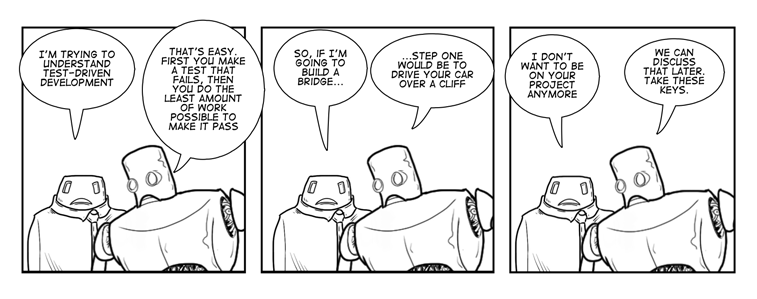
Every iteration my team explores ways of reducing time required for QA/Testing. We are a small team and do not have dedicated resources for Quality Assurance. That being said, what we can do is reduce the amount of defects found during that time. The best way to do that is to follow a Test Driven Development (TDD) methodology where you write your test from requirements before writing application code.
Now of course you cannot test everything but you can test close to one hundred percent of requirement and code coverage. Now Test Driven Development usually is done with Unit Test but it can be done with Functional Verification Test (FVT) and Performance Verification Test (PVT) as well. However FVT and PVT require a level of requirement elaboration/documentation that is not always available. That being said Automated Unit Test done right will reduce a large amount of possible defects.
How to perform Test Driven Development?
Now I alread described Test Driven Development (TDD) above but I thought I would go a bit deeper first before jumping into implementation across languages. TDD is more than writing a test before code. Rather it is a repetitive iterative process of adding changes in bite sized pieces.
Test Driven Development Workflow
I recommend the following path:
Start by writing a test for the smallest requirement, defect, or change request that has little to no dependencies. The smaller the change the less understanding you will need of the larger picture.
Run the test you just wrote. If it succeeds then the existing code supports it and you should move on to the next smallest requirement.
Write just enough code to make all of the test pass. If you have a dependency on another component that has yet to be defined or written then create an interface and mock it (I talk more about this later).
Refactor your code to make it cleaner and smaller while rerunning all the test to ensure you don’t break any functionality. This also removes any dead code from retired functional requirements.
Yes I basically stole from the Wikipedia article but I couldn’t write it any better.
Testing what doesn’t exist
I mentioned before that If you have a dependency on another component that has yet to be defined or written then you should create an interface and mock it. “Mock Objects are simulated objects that mimic the behavior of real objects in controlled ways.” It is important to note that these objects do not perform that functionality of what they are mocking. Rather they simply provide expected output for expected input.
Across three languages
In order to demonstrate how to write unit test and mock objects across three languages I decided to write the same component three times in each language.
The component is a simple application to read an email from a string and look up the title in an external directory (i.e. LDAP). Now the external directory doesn’t exist so I use a Mock object to test the components.
Now I am going to talk a bit about performing Unit Test, mocking, reporting coverage in Perl, JavaScript, and Java.
Unit Testing Perl
Unit testing in Perl has been around for a long time. However I often describe Perl code as being pre or post 2008. That is when Adam Kennedy gave a talk about managing a massive amount of perl code and why testable code is important.
My favorite quote from the talk is “Our ability to create software is limited, primarily, by our ability to test software.” I also love the references to the city of London’s 19th century sewers. I recommend every Perl programmer watch this presentation. You can look at any Perl code and tell if the developer used principals from this talk.
Now perl is a very dynamic language where you may only be able to identify dead code during runtime. I typically use Devel::Cover to identify dead code.
Unit Testing in JavaScript
There are numerous testing frameworks in Javascript. Since I mostly develop using the Dojo Toolkit I use DOH. As for Mock Objects in JavaScript there are several libraries out there. However since Javascript does not support Interfaces or Abstract Classes I have to cheat. I create stub class where each required function throws an error. For instance in one of the examples I create this interface.
On one hand you get the benefit of an interface but the failure to implement a function is only known during runtime which is bad. As always I am open to suggestions and feedback.
Code coverage also gets a bit complicated with Javascript. I have tried extensions to Firebug and a few other tools. Unfortunately understanding Dojo separate from my code has always proved troublesome. Someone recommended JSCover but I haven’t had a chance to try it yet.
Unit Testing in Java
JUnit is possibly the most popular Unit Testing frameworks. It is also included within Eclipse by default and there are tools provided to make Test Driven Development a first class citizen. There are numerous tutorials available on the topic.
Test Driven Development is a very powerful tool. Looking at code writen using this method there is an obvious difference. Code is less buggy and easier to manage. You have confidence your code is sound without having to implement the entire application. I also want to mention Jurgen Appelo excellent article on implementing a requirement across multiple iterations TDD style.
Now I purposely left some topics out for future blog post. For instance as I mentioned earlier it is possible to use Functional Verification Test (FVT), Business Verification Test (BVT). Performance Verification Test (PVT) as part of Test Driven Development. You can do more than simple Unit Test but there are more than a few gotchas.
One of the great things about Rational Team Concert is it brings an awareness to a Development team. Now outside of the CLM Dashboards and the thick clients that awareness continues in the forms of email and news feeds. Now everyone knows email but when left unchecked your Inbox can become unmanageable.
My personal preference is to use the news feed capability of Rational Team Concert. Not only does it provide notifications out of my inbox but it allows me to have greater control over what I want to see. I can take any work item query and turn it into a feed.
In Rational Team Concert you can create a feed of nearly anything. Unfortunately creating a feed from the web interface is a bit difficult but from the client is quite easy.
Start by creating a Work Item query of the news you are interested. I should mention that there are other events that can be subscribed to other than work items.
Right click the query in the Team Artifacts view and select “Subscribe to Query Feed.”
Retrieve the URL for that feed subscription by right clicking the new feed and selecting “Copy Feed URL.”
Enabling Form Authentication in the IBM Notes Client
First thing is to create a new account for Form Authentication In your Notes Client by selecting to
Now the feed you copied from the client should work in the IBM Notes client feed reader.
The beauty of this is you can now create notifications with a greater amount of flexibility. For instance you can use a single feed to notify an entire team when a new Critical defect is submitted.
Sandro Mancuso recently published a video on “Testing and Refactoring Legacy Code.” One of the key benefits for writing test for legacy code is it allows you to understand the existing code while reducing risk in changing it.
It is a great video but a bit long so here are some of his suggestions.
Do not change production code unless it is covered by a test.
Start testing from shortest to deepest branch. The Shortest branch will require less understanding of the code base.
Start refactoring from deepest to shortest branch.
Do not execute another class from the unit test. The test should only care about the class it is testing. Otherwise you may be testing components (database, external systems, etc…) that you don’t want to test right now. Refactor the Singleton, Static call, or object to a protected method (Seam) and overwrite it.
Feature envy is when one class/method has functionality that probably belongs in another class.
Guard clause is a parameter check and should be moved earlier.
Bring declaration of variables and the code that uses the variable closer together.
My team is currently in the process of documenting a project we inherited. The project was a skunkworks effort and documentation wasn’t as important as proving that it works. The developer who wrote it is no longer on the project and isn’t the most pleasant person to interact worth so we are on our own. The interesting thing about this exercise is we are realizing how much lack of documentation cost a project.
The number one reason for documentation is so another developer can step in and keep the project running if you are hit by a bus, falling piano, or UFO. The big motivator for us is code refactoring and removing dead code becomes very hard without proper documentation.
I was watching a presentation by Jack Diederich on code reduction and one of the reasons he often hears against removing dead code is “It might be used…somewhere.”
As he points out when using a dynamic language it can be very hard to identify if code is called or not. He recommends adding a comment to indicate where code is called from. Using code coverage tools does help identify dead code but you need to have a full understanding of the use-cases or else you may accidentally remove code that addresses an edge case.
Documenting legacy components can be seen as an expensive part of a project but will ultimately reduce technical debt and save time later on.
When I first started developing web sites choosing a color was easy. There were not that many to choose from. Of course HTML at that time supported 16 million colors but any competent web developer would limit it to web safe colors. I remember working for a small startup and had to tell the head of marketing that the logo and branding colors were not web safe. The Visibone color guide came in very handy back then.
Today picking a color scheme for a web site is not as easy because you have significantly more colors to choose from. Now I should mention that not all colors appear the same on each monitor and people see shades of color differently. Radiolab did a great podcast on how we see and experience Colors.
When I am developing sites for work it is easy because their are color guidelines I need to be in sync with. So here is my advice for picking colors for a personal site.
Start with one color
Most WordPress themes ask you to choose a plethora of colors (background, foreground, text color, title color, link color, etc…). You want to start with one color and select other colors that complement. The next question comes down to how to pick one color. Now people spend a lot of time and money to come up with a single color. There is a whole psychology behind picking colors.
Possibly one of the simplest way to pick a color is to start with an image that represents you. I am an avid Scuba diver so I started with an underwater photo I took of a shipwreck.
Now I am not a fan of background images. Frankly they can be extremely hard to do right and can add a good amount of size to a page. So I take the image and use a service like http://www.pictaculous.com/ to find out what colors I should consider.
Of the three colors selected I chose #001C4A.
Try out different schemes
I found my notes on color from Art class in College. There are plenty of different methods on choosing complementary colors which do not always translate well for websites. Even the tried and true 30/30/60 can look odd. Frankly you end up back where we started with color doesn’t always look the same and the color of the content (pictures, embedded players, etc…) can make that color look different.
What I like to do is just try different palettes that contain my color from popular color palettes sites like Kular, ColourLovers, ColoRatate, or Color Explorer. It is very simillar to the process of picking up swatches at Home Depot and attaching them to the wall to see if they work.








 Conclusion




 Aaron Cohen